Free VS Code extension · local-first
Diagnose GPU crashes where you work.
Diagnose CUDA, NCCL, PyTorch, Xid, Slurm, Kubernetes, and vLLM failures without leaving VS Code. When your logs contain the evidence, Denpex identifies the initiating failure behind the cascade and suggests a fix and verification step. When evidence is missing, it explains what to collect next.
Download the current package, then choose Install from VSIX in the Extensions menu. From the download folder, you can also run:
code --install-extension denpex-diagnostics-1.4.17.vsixCloud incident notification pilot: version 1.4.17
This tested build polls your owned cloud reports and offers a link when new incidents arrive. Install the VSIX manually, connect a scoped key with fleet read access, and verify one incident. A diagnosis notification does not mean repair is verified. The Marketplace release is older. Use this download for the current engine and qualifications.
Download current VSIX 1.4.17 · SHA-256 checksum
In VS Code, choose Extensions, then Install from VSIX, and select the downloaded file. Cloud access is optional; local diagnosis remains available without an account.
- Unlimited local use
- No account required
- Remote-SSH ready
Root cause
Rank 3 exhausted GPU memory before collective 918233.
trainer-02 · rank 3 · CUDA OOM
ranks 0, 1, 2 · NCCL watchdog timeout
nvidia-smi --query-compute-apps=pid,used_memoryThe aha moment, before you have a failed job ready
Every install opens a guided walkthrough with a realistic NCCL cascade. One click shows the initiating rank, collateral victims, fix ladder, and the check that verifies recovery.
Interactive diagnosis preview
A complete patient-zero analysis in under 30 seconds
Crash evidence
Rank 3 runs out of GPU memory
Runs through the engine bundled in the extension. No account, API key, or network request.
The report you actually get
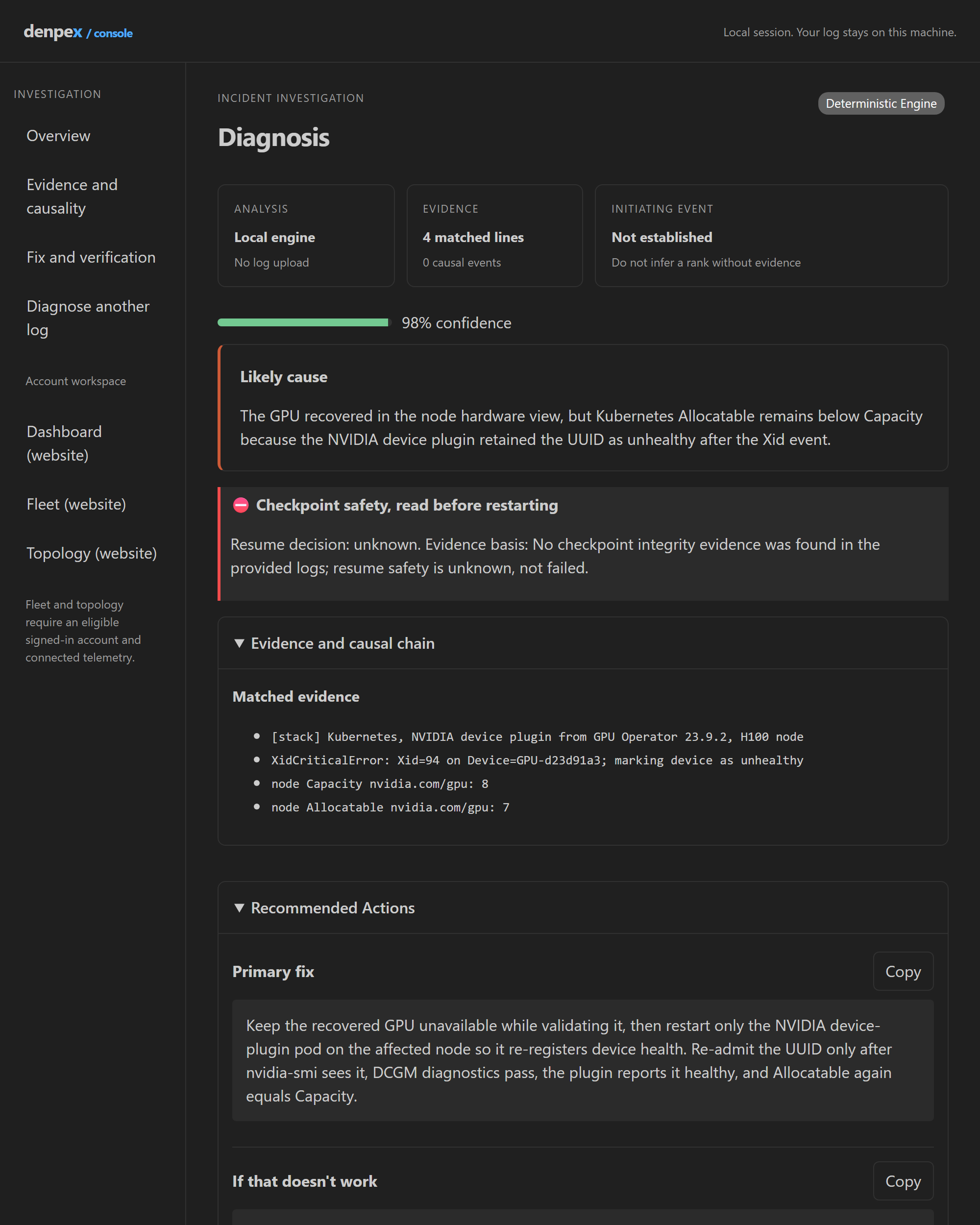
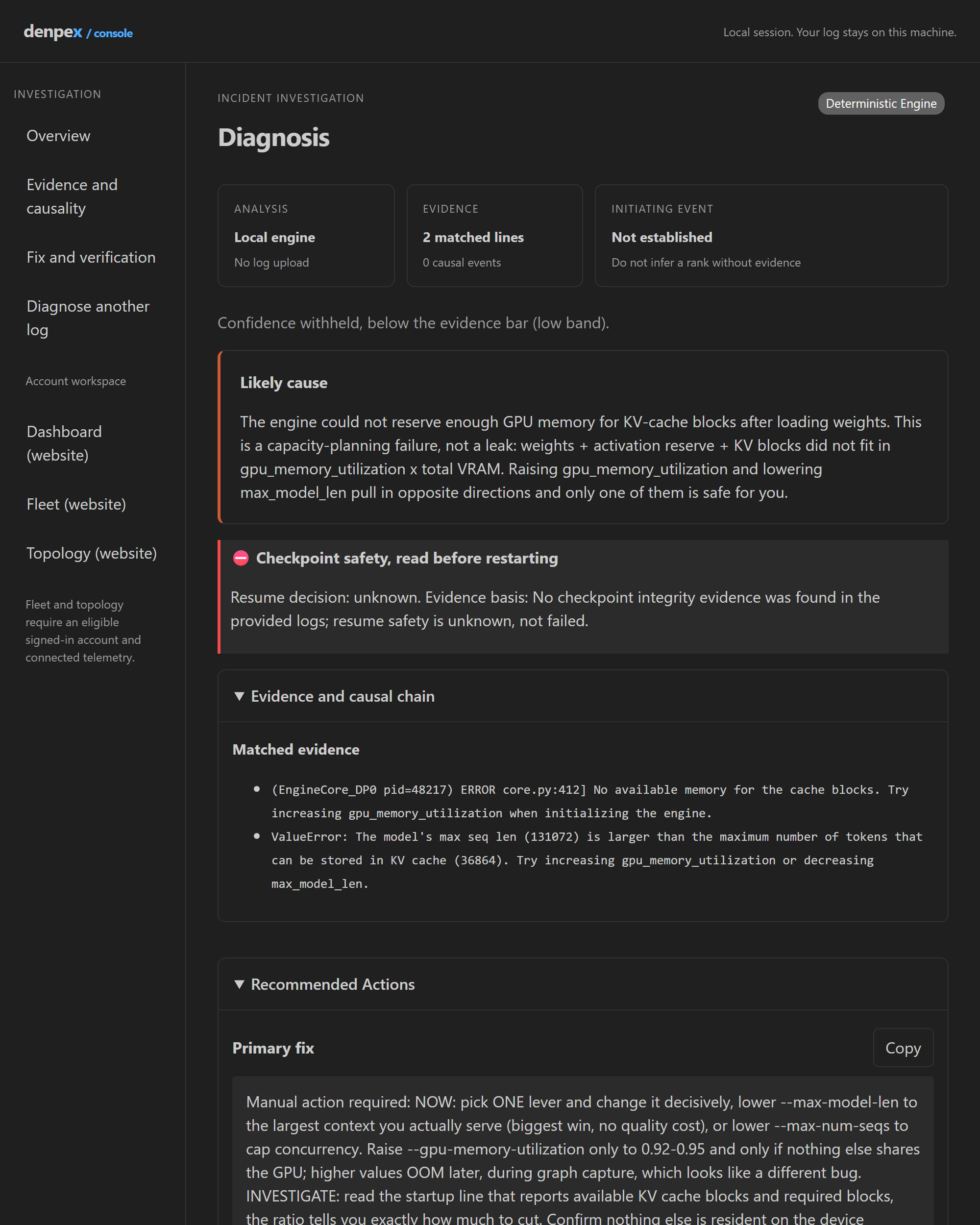
Both panels below are the bundled offline engine answering one of the sample failures that ship with the extension. No account, no network, no mockup.
Visible wherever GPU failures happen
Selected traceback
Right-click selected error text and choose Diagnose GPU/ML Error.
Terminal failure
Use Diagnose Last Failure from the terminal context menu.
Log editor
Open a .log or .out file, or traceback content, and use the editor-title action.
Denpex sidebar
Current logs, recent local diagnoses, samples, and privacy status stay one click away.
The free engine is the product, not a metered preview
The deterministic engine and pattern database ship inside the VSIX. Local diagnoses cost Denpex nothing to run, so they are unlimited. No API key, sign-in, or network is required.
- Logs remain on the extension host during local diagnosis.
- Remote-SSH diagnosis runs beside the remote logs.
- Cloud escalation is visible, contextual, and optional.
Five one-click incidents included
Rank-local OOM
Find rank 3 before the NCCL watchdog errors on every other rank.
Xid 79
Route a GPU fallen off the bus to reset, PCIe inspection, or RMA screening.
NCCL interface mismatch
Catch peers selecting ib0 and eth0 before changing collective timeouts.
Kubernetes stale GPU health
Separate recovered hardware from stale device-plugin registration.
vLLM KV-cache exhaustion
Fit context length and concurrency to the cache blocks that actually exist.
From first answer to team value
Prove the fix on your own incident before you buy
1. Find the initiating failure
Run a bundled sample, then diagnose your own CUDA, NCCL, or Xid log locally. See the first failed rank, evidence, fix, and verification step.
2. Test the harder case
Run one immediate cloud deep analysis without an account. Further anonymous analyses may need a browser check. Compare the answer with the cause and action your team confirmed.
3. Evaluate with your team
Request a 30-day Team code with your work email. Open the emailed link within 7 days of the first request and sign in with the same address. Established company domains can activate automatically across mail providers after verification; uncertain domains go to support review. After activation, run Denpex: Connect Account in VS Code and approve the code shown by your editor. No API key copying and no automatic log upload. The trial includes up to 50 cloud diagnoses a day and saved history.
No card. No automatic subscription. Local diagnosis stays free.
Purpose-built diagnosis, without giving up your other tools
These tools answer different questions and work well together.
| Question | Denpex extension | General AI chat | NVIDIA Nsight |
|---|---|---|---|
| Which rank initiated this cascade? | Cross-rank causal ordering | Depends on pasted context | Profiling and timeline evidence |
| Can it run without uploading logs? | Yes, bundled offline engine | Depends on the deployment | Yes, local developer tooling |
| Does it return an exact operational fix? | Fix ladder plus verification | Prompt-dependent | Evidence for manual debugging |
| Best use | Incident root cause and remediation | Exploration and novel reasoning | Kernel, systems, and performance analysis |
VS Code extension FAQ
Does the Denpex VS Code extension upload my logs?
Local diagnosis runs in the engine bundled with the extension and makes no network request. Logs are sent only when you explicitly run cloud deep reasoning or enable the opt-in auto-escalation setting.
Does it work over Remote-SSH or without Node.js installed?
Yes. The engine uses the runtime shipped with VS Code, so a separate system Node.js installation is not required. When the extension runs remotely, diagnosis runs where the extension host and logs are located.
What can the free extension diagnose?
The bundled deterministic engine covers CUDA, NCCL, PyTorch DDP and FSDP, Xid and NVLink faults, DeepSpeed, Slurm, Kubernetes GPU components, vLLM, Triton, JAX, InfiniBand and RoCE. Local use is unlimited.
When should I use cloud deep reasoning?
Use it after a low-confidence or novel local result, when multiple causes remain plausible, or when you need saved incident history and team or fleet workflows. The local answer remains available either way.
Diagnose a real failure before deciding what else you need
Install the free extension, run one sample, then try your own logs. Cloud and fleet features stay optional.